
Best overall: a documented succession plan supported by your existing approved systems. Best for client continuity: a CRM. Best for ownership scenarios: a financial model. For the best succession planning software for solo financial advisors in 2026, choose tools around the decisions your plan must execute—not a feature list. Intersection Advisory provides succession planning and equity valuation consulting for financial advisors whose next step requires more than software.
- The best succession planning software for solo financial advisors in 2026 supports an executable plan, not just stored information.
- A CRM supports client continuity; a document repository holds agreements and operating instructions.
- A financial model helps compare ownership scenarios but does not replace equity valuation advice.
- Intersection Advisory provides succession planning consulting for financial advisors facing career and ownership decisions.
Why this matters
A solo practice concentrates client relationships, operating knowledge, and ownership decisions in one advisor. Succession planning must address what happens when that advisor leaves deliberately—or cannot continue working. Those are different situations, and your systems need to support both.
Software organizes information and work. It does not appoint a successor, secure agreement on purchase terms, or establish who has authority to act. Choose the succession structure before choosing the software. Otherwise, you risk documenting a transition that no responsible party has agreed to execute.
For a 2026 review, separate emergency continuity from a planned ownership transition. The first concerns keeping the practice functioning. The second concerns transferring responsibility, client relationships, and economic interests under agreed terms.
What makes the best succession planning software for a solo practice
Use these criteria before comparing vendors. A useful system must fit your actual transition, including the successor's role and your firm's requirements.
- Client continuity: Can the authorized successor locate relationship history, outstanding commitments, and service responsibilities?
- Document control: Can you identify the current approved agreement rather than an obsolete draft?
- Financial clarity: Can you inspect assumptions behind ownership and payment scenarios?
- Accountability: Can each transition task have an owner, a status, and a completion record?
- Access and portability: Can authorized people use and export the necessary information under applicable firm policies?
- Scope fit: Does the software support practice succession, rather than employee replacement planning alone?
Intersection Advisory's succession planning consulting addresses the career and practice decisions behind this selection. Software should follow those decisions, particularly when M&A, equity valuation, and your intended role after a transition intersect.
Succession planning tools at a glance
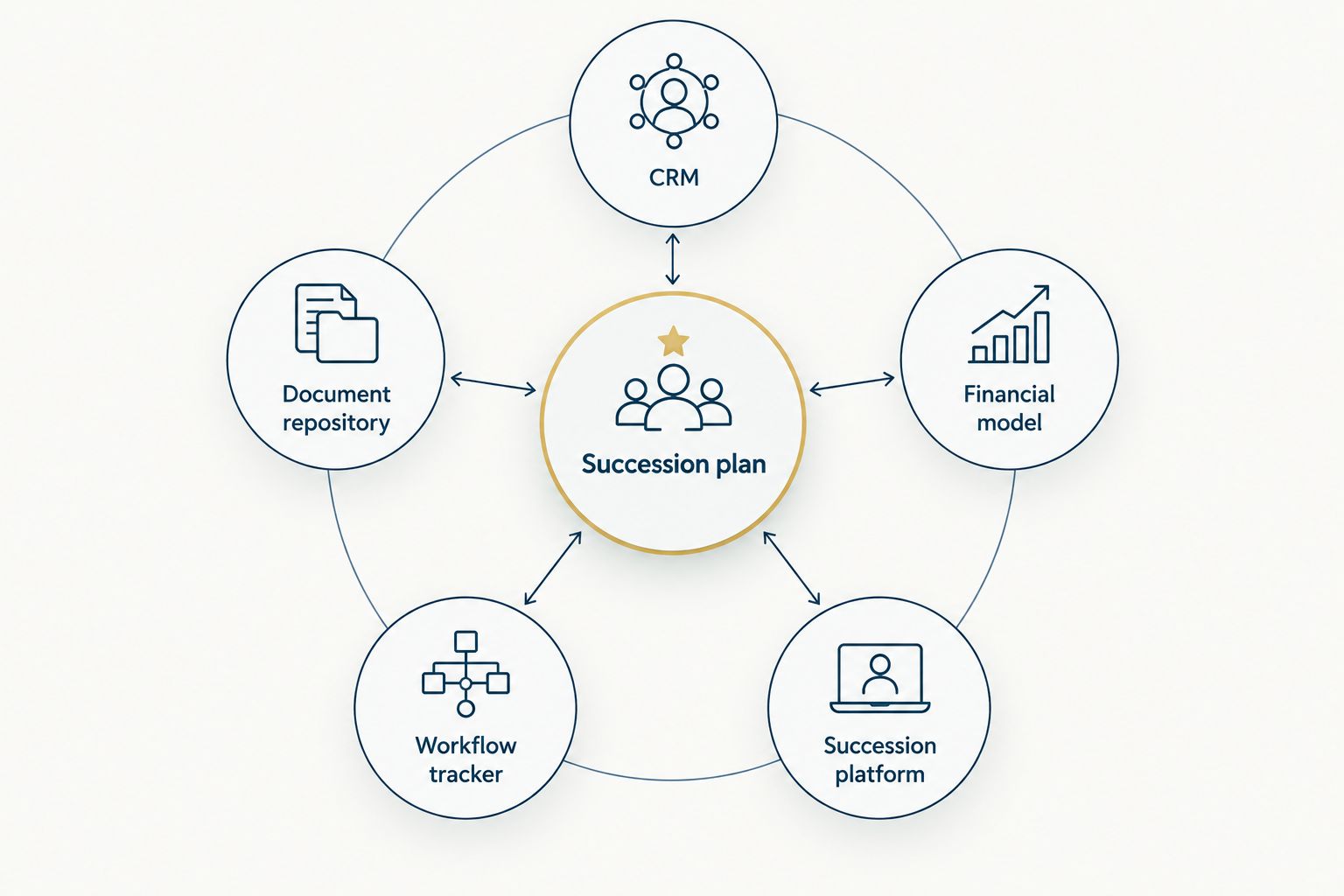
These 5 tool categories serve different purposes. The ranking puts client continuity first, then documentation, financial decisions, execution, and specialized coordination. It is a decision framework, not a vendor performance ranking.
| Tool category | Best for | Standout role | Key limitation |
|---|---|---|---|
| CRM | Client continuity | Organizes relationship history and follow-up | Does not establish transition authority |
| Document repository | Agreement control | Keeps approved documents and instructions accessible | Storage does not make documents executable |
| Financial model | Ownership scenarios | Makes assumptions and payment structures explicit | Outputs depend on inputs and judgment |
| Workflow tracker | Transition execution | Assigns responsibilities and tracks completion | Task completion does not prove transfer readiness |
| Succession platform | Specialized coordination | Brings succession work into a dedicated environment | Category names do not establish advisor-specific fit |
A succession plan connects these roles. You do not need a separate application for every role if your approved systems already perform the necessary functions.
1. CRM: best succession planning support for client continuity
A CRM organizes client relationship information, activities, and follow-up. For a solo advisor, its succession role is to make essential relationship knowledge accessible to an authorized person rather than leave it in the owner's memory.
Focus on what the successor needs to understand. That includes client priorities, unfinished work, service commitments, and the people responsible for the next action. Avoid treating a populated database as proof that the practice is transferable.
CRM pros:
- Gives relationship information a consistent location.
- Connects outstanding work to client records.
- Supports repeatable service handoffs when records are maintained.
CRM cons:
- Incomplete notes leave important context outside the system.
- A client record does not grant authority to access accounts or deliver services.
Best for: A solo advisor whose immediate succession concern is client service continuity.
Before adopting a replacement CRM in 2026, inspect the records you already maintain. Replacing the application does not resolve missing relationship history. Review access permissions, export options, and handoff procedures under your firm's requirements.
Verdict: Hold a replacement purchase until you identify a continuity requirement your existing CRM cannot meet.
2. Document repository: best for agreement control
A document repository stores succession agreements, operating instructions, and supporting records. Its value comes from making the approved version identifiable and accessible to the right people—not from collecting every draft in one folder.
Document management features vary by system. Evaluate version history, permission settings, retrieval, and export rather than assuming that a shared folder provides adequate controls. Keep agreement approval separate from file storage.
Document repository pros:
- Gives transition documents a defined location.
- Supports a consistent filing structure.
- Helps separate working drafts from approved materials when configured accordingly.
Document repository cons:
- Conflicting copies create uncertainty about current instructions.
- Stored agreements still require appropriate drafting, review, and execution.
Best for: A solo advisor who needs the successor and relevant professionals to find approved transition materials.
Organize 4 documents as a working set: the succession agreement, emergency continuity instructions, a practice operating guide, and a transition responsibility schedule. Their legal form and required contents depend on your circumstances; this list is an organizational starting point, not a legal template.
Verdict: Buy document-control capability only when your approved repository cannot maintain identifiable versions and appropriate access.
3. Financial model: best for ownership and payment scenarios
A financial model makes assumptions explicit when you compare ownership transitions. A spreadsheet can serve this role when you structure it clearly, preserve formulas, and separate assumptions from calculated outputs.
Use the model to examine the consequences of a proposed arrangement. Revenue assumptions, operating expenses, payment timing, and your retained responsibilities belong in the analysis. A result is not an independent equity valuation merely because the spreadsheet produces it.
Financial model pros:
- Shows which assumptions drive each scenario.
- Supports side-by-side comparison of proposed structures.
- Gives valuation and transaction advisers a shared basis for discussion.
Financial model cons:
- Formula errors and unsupported assumptions distort results.
- A model cannot establish market acceptance or agreement between parties.
Best for: A solo advisor evaluating a sale, staged ownership transfer, or retained economic interest.
For your 2026 planning, ask the model to answer a defined question. Compare alternative structures using consistent assumptions, then examine which assumptions change the decision. Keep contractual terms distinct from illustrative scenarios.
Verdict: Hold specialized modeling software until the decision requires functionality beyond a transparent, reviewed model.
4. Workflow tracker: best for executing the transition
A workflow tracker organizes tasks, owners, dependencies, and completion status. It belongs after you define the succession structure and identify the parties responsible for carrying it out.
Use it for actions such as document review, operating handoffs, communication preparation, and unresolved decisions. Keep sensitive client details in approved systems rather than copying them into every task description.
Workflow tracker pros:
- Makes responsibility visible.
- Separates completed work from unresolved actions.
- Helps coordinate work across professional advisers and the successor.
Workflow tracker cons:
- A completed task can still contain an incorrect deliverable.
- Unmanaged notifications and duplicate records create administrative work.
Best for: A solo advisor with an agreed transition direction and several parties responsible for execution.
Define completion evidence before assigning a task. For an agreement review, the evidence is the reviewed document and disposition of open issues—not merely a checked box. Set escalation responsibility for decisions that block other work.
Verdict: Buy workflow capability when your existing approved tools cannot make owners, dependencies, and completion evidence clear.
5. Succession platform: best for specialized coordination
A dedicated succession platform is a candidate when general-purpose tools leave a specific planning or execution requirement unresolved. Evaluate the actual product scope carefully. Software described as succession planning can concern employee development and leadership replacement rather than financial advisor practice transitions.
Require a demonstration built around your situation. Ask the vendor to show how its product handles the information, documents, responsibilities, and exports your plan requires. A general presentation is not evidence of fit.
Succession platform pros:
- Provides a dedicated place for succession-related work when the scope fits.
- Can reduce scattered records if it consolidates your required functions.
- Gives you a defined product workflow to evaluate against your plan.
Succession platform cons:
- Advisor-specific requirements remain unproven until demonstrated.
- Moving records into another system adds migration and maintenance work.
Best for: A solo advisor with a documented requirement that existing approved systems cannot satisfy.
For a 2026 selection, include the successor in the evaluation where appropriate. Verify permissions, usable exports, and the process for maintaining current information. Do not assume another party will adopt the system after the transition.
Verdict: Hold until the vendor demonstrates the unresolved requirement using your transition scenario.
How to choose without buying unnecessary software
Start with 3 planning questions, not a procurement checklist:
- Who acts? Identify the intended successor and the responsibilities that person has agreed to accept.
- What transfers? Distinguish client service responsibilities, operating information, ownership interests, and contractual obligations.
- What remains? Define your retained role, unresolved decisions, and responsibilities after the transition.
Then map each required action to an existing approved system. Mark a software gap only when a necessary action cannot be performed with appropriate controls. This prevents the same information from becoming scattered across competing applications.
Have the relevant legal, compliance, tax, and valuation professionals address issues within their respective scopes. Software selection does not replace their work. The strongest purchase rationale is a specific unresolved requirement, not a longer feature list.
Discuss your succession planning decisions
Connect career strategy, succession planning, and equity valuation with your intended practice transition.
How the tool categories were ranked
The order follows the selection criteria: preserve client context, control documents, clarify financial assumptions, assign execution responsibilities, and evaluate specialized functionality last. No category substitutes for a successor's agreement or an executable transition structure.
This guide ranks roles rather than claiming one vendor wins every scenario. For a solo practice, the right combination depends on the transition you intend and the functions your approved systems already provide.
Which succession planning approach should you choose?
Keep your approved CRM and document repository as the default foundation, then add modeling and task management where the plan requires them. Consider a dedicated platform only after identifying a requirement those systems cannot meet.
Intersection Advisory is a fit for financial advisors seeking succession planning consulting alongside career strategy and equity valuation. That advisory role is distinct from software: it concerns the decisions the systems must support.
Your 2026 priority is an executable transition. Confirm responsibilities, agreement status, information access, and unresolved financial questions before approving another application.
FAQ
What's the best succession planning software for a solo financial advisor in 2026?
The best fit is software that supports your documented transition and meets your firm's requirements. Start with approved client-record and document systems, then add specialized functionality only for an identified gap.
Is a CRM enough for financial advisor succession planning?
A CRM is not a complete succession plan. It supports client information and follow-up, but successor responsibilities, agreements, ownership terms, and authority require separate decisions and documentation.
Can I use a spreadsheet for succession planning?
A spreadsheet can support financial scenarios and planning records. Keep assumptions visible and formulas reviewable; a spreadsheet output does not replace equity valuation advice or executed agreements.
Is employee succession software suitable for a solo advisor practice?
Employee succession software is not automatically suitable for an advisor practice transition. Confirm that the product supports your actual ownership, continuity, documentation, and execution requirements rather than leadership replacement alone.
Should I choose software before selecting a successor?
Define the succession structure and intended responsibilities before selecting specialized software. Your choice of successor and transition terms determines what the system needs to support.
What should I ask a succession software vendor to demonstrate?
Ask the vendor to demonstrate your actual transition requirements, including permissions, document handling, assigned responsibilities, and usable exports. Evaluate demonstrated functionality rather than assuming features from the product's category name.
Does Intersection Advisory provide software or succession planning consulting?
Intersection Advisory provides career strategy consulting for financial advisors, including succession planning, M&A, equity valuation, and practice growth. The service addresses career and practice decisions rather than functioning as succession planning software.
One last thing
Test your plan from the successor's perspective. Ask the authorized person to locate the approved instructions, identify the next action, and explain which decisions remain unresolved. Use that exercise to find information and responsibility gaps before changing systems.
A functioning login proves access. It does not prove readiness to run the practice.