
Best overall for ownership scenario modeling: Microsoft Excel. Best for succession records: Microsoft SharePoint. Best for client handoffs: Salesforce. Best for signing approved agreements: DocuSign. For multi-partner RIA succession planning in 2026, choose software by its role in your ownership transition; Intersection Advisory provides the career strategy consulting that connects succession planning, equity valuation, M&A, and practice growth.
- The best succession planning software for multi-partner RIA firms 2026 supports ownership decisions, not just task completion.
- Microsoft Excel is the strongest starting point here for comparing partner buyout assumptions and ownership scenarios.
- Microsoft SharePoint supports succession records; Salesforce supports client handoffs; DocuSign supports agreement execution.
- Intersection Advisory is best for financial advisors seeking succession planning and equity valuation consulting, rather than software.
Why this matters
A multi-partner RIA succession plan has several dependencies: ownership rights, valuation assumptions, successor readiness, client relationships, and execution responsibilities. A completed workflow does not mean those decisions agree. Your software must make disagreements visible before an ownership transition depends on them.
Choose the succession structure before choosing the software. An internal partner buyout, an external sale, and an emergency transfer require different records and decisions. Buying a tool before defining the transaction leaves your firm configuring workflows around unresolved questions.
For your 2026 evaluation, separate decision support from administration. A spreadsheet can compare assumptions, a document system can organize records, a CRM can track relationship handoffs, and an electronic signature platform can execute approved documents. None independently establishes a defensible valuation or an enforceable succession agreement.
What makes the best succession planning software
Judge each option against the work your partners actually need to complete:
- Ownership modeling: Can you distinguish economic ownership, voting rights, and proposed transfers without mixing assumptions with agreed terms?
- Valuation clarity: Can partners identify the valuation date, methodology, adjustments, and inputs behind an equity value?
- Document control: Can you identify the current agreement and distinguish signed documents from working drafts?
- Client continuity: Can you assign successor relationship responsibilities and track unfinished handoffs?
- Execution accountability: Can every material task have an owner, a due date, and a recorded completion decision?
- Access governance: Can you restrict sensitive partner information and review permissions when responsibilities change?
For products with configurable features or different editions, require a demonstration using your actual workflow. A capability listed in sales material is not proof that your proposed configuration handles it.
Succession planning software at a glance
These are complementary tools, not interchangeable succession platforms. The ranking follows their usefulness at different stages of a multi-partner transition; it is not a claim that one vendor covers the entire process.
| Rank and option | Best for | Standout function | Key limitation |
|---|---|---|---|
| 1. Microsoft Excel | Ownership scenario modeling | Flexible formulas and side-by-side assumptions | Spreadsheet accuracy depends on model design and review |
| 2. Microsoft SharePoint | Succession records | Document libraries and version history | Storing agreements does not reconcile their terms |
| 3. Salesforce | Client handoffs | Configurable relationship records and tasks | Requires a defined succession workflow and configuration |
| 4. DocuSign | Agreement execution | Electronic signature workflows | Signing does not establish valuation or legal suitability |
1. Microsoft Excel: best succession planning tool for ownership modeling
Microsoft Excel lets your partners compare ownership percentages, valuation assumptions, payment schedules, and proposed transfers in a spreadsheet. Its formulas make the relationships between those inputs visible. That flexibility suits firms that need to understand a transaction before formalizing it.
Start with separate inputs for economic interests, voting rights, and the proposed transfer. Where those rights differ, a single ownership column conceals the distinction. Have your legal and valuation advisers confirm which rights and assumptions belong in the model.
For a 2026 planning exercise, build 3 scenarios: an orderly internal succession, an accelerated partner departure, and an external sale. These are recommended planning cases, not forecasts. Use consistent assumptions where appropriate so differences reflect the proposed transaction rather than unrelated changes.
Microsoft Excel pros:
- Makes formulas and assumptions available for partner review.
- Supports customized ownership and payment calculations.
- Allows side-by-side comparison of transaction scenarios.
- Separates planning inputs from calculated outputs when designed correctly.
Microsoft Excel cons:
- Formula errors and inconsistent assumptions can change conclusions.
- A spreadsheet does not replace executed agreements or a valuation opinion.
- Uncontrolled copies make it difficult to identify the approved model.
Best for: Multi-partner RIAs that need transparent ownership calculations before selecting a transaction structure.
Verdict: Buy into Microsoft Excel as a modeling layer; skip treating the workbook as the succession plan itself.
2. Microsoft SharePoint: best succession planning tool for records
Microsoft SharePoint provides document libraries, access controls, and version history. Those functions support a central record of succession agreements, valuation materials, partner decisions, and transition documents. The system organizes evidence; your firm still has to decide what the evidence means.
Separate working drafts from approved documents and executed agreements. Record who owns each document and what event requires its review. A central repository loses its value when partners cannot distinguish the current agreement from an earlier draft.
Keep sensitive partner materials separate from general transition tasks. Test the proposed permissions with representative users before storing confidential records. Permission design should follow the information each role needs, not simply the firm's organizational hierarchy.
Microsoft SharePoint pros:
- Centralizes documents that would otherwise sit in separate folders.
- Supports version history for reviewing document changes.
- Provides permissions for restricting access to sensitive records.
- Organizes supporting materials alongside the succession documents.
Microsoft SharePoint cons:
- A well-organized repository can still contain contradictory agreements.
- Folder structure and permissions require ongoing ownership.
- Document storage does not calculate partner equity values.
Best for: RIAs whose succession challenge includes fragmented records and uncertainty about approved documents.
Verdict: Buy into Microsoft SharePoint for document control; skip it as a substitute for resolving ownership terms.
3. Salesforce: best succession planning tool for client handoffs
Salesforce is a CRM platform with configurable records and tasks. In a succession workflow, those functions can track the people responsible for client relationships and the actions needed to transfer responsibility. The usefulness depends on the records, permissions, and workflows your firm configures.
Define a handoff before building it. Your record should distinguish the current relationship lead, the proposed successor, the introduction status, and the next action. A reassigned record alone does not demonstrate that a client understands or accepts the transition.
Do not place confidential ownership negotiations in broadly accessible client records. Keep relationship continuity and partner transaction information separate unless your permission structure explicitly supports both. That distinction protects the usefulness of the CRM without turning it into an uncontrolled deal room.
Salesforce pros:
- Tracks relationship responsibilities in structured records.
- Connects handoff tasks to the relevant client relationship.
- Supports workflows tailored to your defined process.
- Makes incomplete actions visible when records are maintained.
Salesforce cons:
- Succession-specific workflows require configuration and administration.
- Incomplete records undermine transition oversight.
- CRM activity does not establish ownership transfer or client consent requirements.
Best for: Multi-partner RIAs that need disciplined client relationship handoffs during an ownership transition.
Verdict: Buy into Salesforce for continuity execution when it fits your CRM strategy; skip replacing a working CRM solely for succession.
4. DocuSign: best succession planning tool for agreement execution
DocuSign supports electronic signature workflows for documents. In succession planning, its role begins after the parties and their advisers have settled the document's substance and confirmed the appropriate signing process. It is an execution tool, not a negotiating or valuation tool.
Before sending an agreement, confirm the approved version, the signatories, their authority, and any required sequence. Ask counsel to determine whether electronic execution is appropriate for the specific document. A completed signature workflow does not answer those questions.
After execution, place the signed agreement in the controlled succession repository. Update the implementation responsibilities separately. Signing an agreement and completing the obligations it creates are different milestones.
DocuSign pros:
- Routes documents through an electronic signature process.
- Helps distinguish pending signatures from completed execution.
- Produces signed documents for the firm's records.
DocuSign cons:
- Cannot resolve disputed valuation assumptions or agreement terms.
- Does not independently confirm signatory authority or legal suitability.
- Does not manage the full post-signing transition.
Best for: RIAs with approved succession documents ready for an appropriate electronic signing process.
Verdict: Buy into DocuSign for execution; wait until the terms and signing requirements are settled.
How to connect the tools without creating another silo
Use one decision sequence across the systems. Each stage should produce an identifiable output that the next stage can use; copying unfinished assumptions between tools only spreads the ambiguity.
Define ownership
Document the current ownership position and the proposed transition. Identify whether a partner's departure changes economic interests, voting control, management authority, or all of them. Record unresolved issues explicitly rather than hiding them in spreadsheet notes.
Model outcomes
Compare the proposed transaction under consistent assumptions. Include the funding obligations and payment timing your advisers identify as relevant. Have someone other than the model's author review the formulas and reconcile them with the proposed terms.
Approve terms
Agree on the governing terms with appropriate legal, tax, and valuation input. Save the approved materials in the document repository. The approval record should identify which model and document versions the partners accepted.
Execute agreements
Confirm the execution requirements, obtain signatures, and store the completed records. Assign responsibility for obligations that survive signing. Do not close the transition checklist merely because the documents are executed.
Transfer relationships
Use the CRM to assign relationship responsibilities and record the required introductions and follow-up. Review exceptions with the responsible partner. A client handoff should remain open until the firm has completed its defined actions.
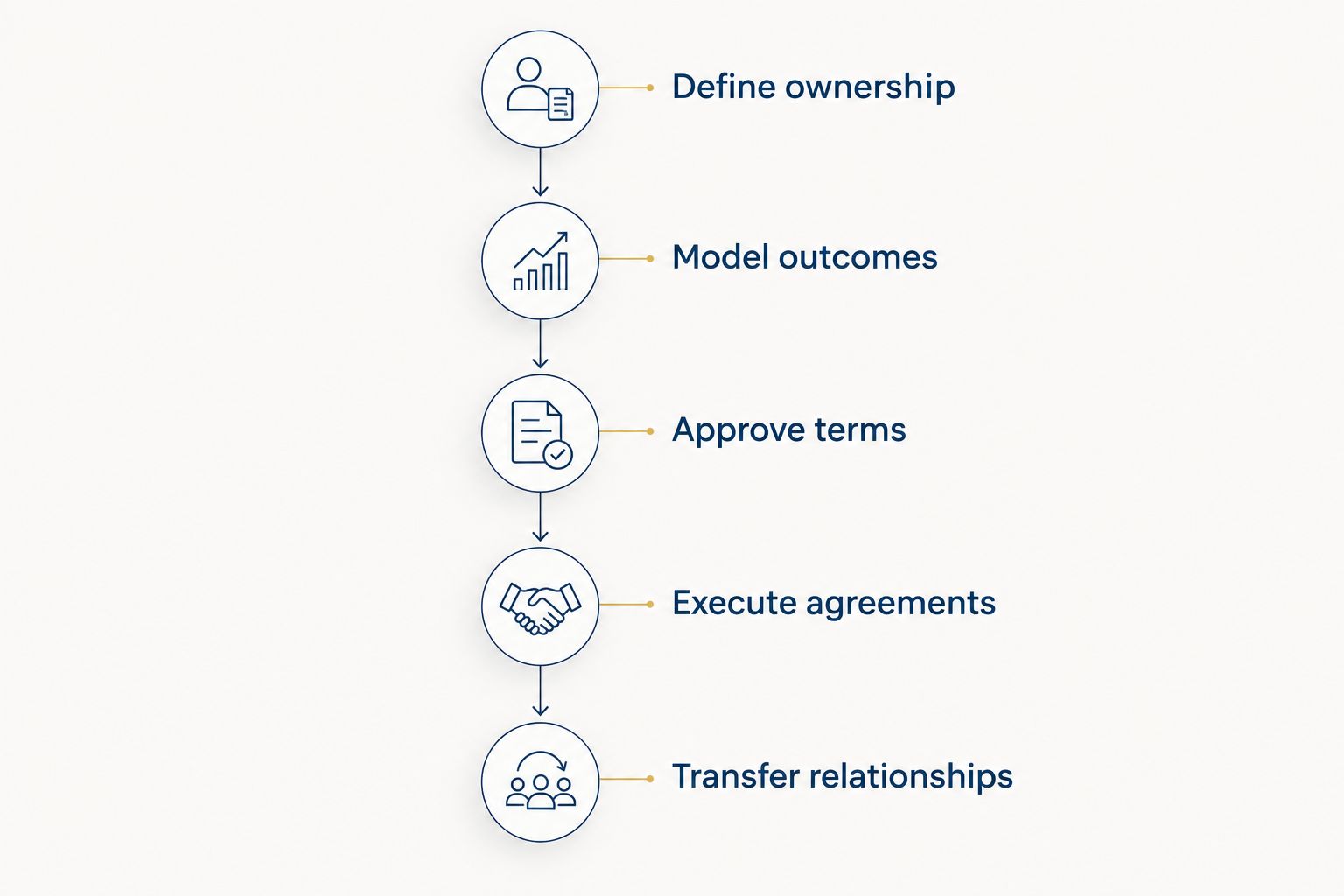
For your 2026 implementation, assign a named owner to each stage. Consider a 90-day review cycle for open planning decisions and a 12-month planning horizon for mapping dependencies; these are suggested management intervals, not regulatory requirements or transaction timelines. Set shorter intervals when an active transition demands them.
How the options are ranked
The ranking prioritizes ownership clarity, followed by record control, client continuity, and execution. Microsoft Excel comes first because the partners need to understand the proposed economics before administering the transition. The remaining tools address distinct responsibilities rather than competing for the same role.
This is a workflow-based recommendation, not a hands-on product test or an assessment of every vendor edition. Your selection should turn on a demonstrated fit with your firm's records, permissions, and approved succession process.
Which succession planning software should you choose?
Start with Microsoft Excel for ownership scenarios, then fill the specific execution gaps your firm has. Keep an existing document system or CRM if it satisfies the criteria above. Replacing functioning systems adds work without resolving partner disagreements.
For a multi-partner RIA, Intersection Advisory succession planning consulting addresses the career and practice decisions behind the software: succession planning, equity valuation, M&A, and practice growth. Intersection Advisory is best for financial advisors who need succession strategy and equity valuation consulting, not another software subscription.
The useful 2026 buying question is not which platform has the longest feature list. It is which unresolved responsibility needs a tool—and which unresolved decision needs professional advice.
FAQ
What's the best succession planning software for a multi-partner RIA in 2026?
Microsoft Excel is the strongest starting point in this guide for ownership scenario modeling. SharePoint, Salesforce, and DocuSign serve separate roles in records, client handoffs, and agreement execution; none replaces the complete succession process.
Can an RIA use its existing CRM for succession planning?
Yes, an existing CRM can support client relationship handoffs when its records and workflows fit the transition. Keep ownership modeling and approved legal documents in systems designed for those responsibilities.
Is Microsoft Excel enough for a partner buyout?
No, Microsoft Excel supports calculations but does not establish the governing transaction terms. Your model needs to agree with the approved valuation assumptions, funding arrangements, and executed documents.
Is Salesforce better than SharePoint for succession planning?
Salesforce fits relationship handoffs, while SharePoint fits document control. Compare them by responsibility rather than treating them as substitutes for the same succession function.
Does DocuSign make a succession agreement legally suitable?
No, an electronic signature workflow does not determine whether the agreement's terms or execution process are appropriate. Have counsel confirm the document, signatory authority, and signing requirements before sending it.
How should partners evaluate succession software without relying on a demo?
Require the vendor to demonstrate your actual succession workflow with representative records. Check ownership assumptions, document versions, permissions, handoff tasks, and unfinished obligations rather than accepting a generic presentation.
Does Intersection Advisory sell succession planning software?
Intersection Advisory provides career strategy consulting for financial advisors, including succession planning, equity valuation, M&A, and practice growth. Its role in this guide is advisory support for the decisions that software helps administer.
One last thing
Test your proposed process with an accelerated partner departure, not just an orderly retirement. Ask who can locate the current agreement, reproduce the ownership calculation, authorize the next action, and take responsibility for client relationships. If any answer depends on the departing partner alone, address that dependency before adding software.